Scoresheets
Making a scoresheet
A scoresheet is a list of scoring lines. Each line says what to count and how many points it makes, and the total adds up every line that counts.
Where to find them
- Profile > Scoresheets lists every scoresheet: Yours first, then the Starters. Tap + to make a new one.
- A game's page has a Scoresheets section with the ones for that game, and Make a scoresheet.
- Log a game, once you've chosen a competitive game and players, has Simple and Scoresheet. With no scoresheet for the game yet, tap Make a scoresheet; with some, Change lists them and ends with Make one…. A sheet you make from here is used for the game you're logging straight away.
- A Table's page has its own Scoresheets, for house rules. More on those below.
Starters, and your own copy
Starters are written from each game's rulebook and checked against games worked out by hand. They can't be changed, so opening one makes your own copy, named "(my copy)", which you can change as you like. The starter stays as it was.
Building one
A new scoresheet opens on Details. You can come back to it from the ⓘ button at the foot of the editor.
- Name: as it shows when logging, like "Thursday rules".
- Games: the games it's offered for. Add a game searches the catalogue; a game with several editions shows as "every edition", and each is included.
- Players: the fewest and most players it's for. Can be played solo is there for later: scoresheets aren't offered for solo games yet.
- Rounds: None, A set number or As many as played. Most games need none. See Tie-breakers and rounds.
- Winner: Highest total wins, or Lowest total for games like golf.
Then close Details and tap Add a category. Your lines gather under Categories. The library, with Search categories at the top, groups every kind of scoring line: Common, Choosing, Comparing players, Rounds and goals and Maths, with a search. Each new line arrives filled in with an example, so you change it rather than start from nothing.
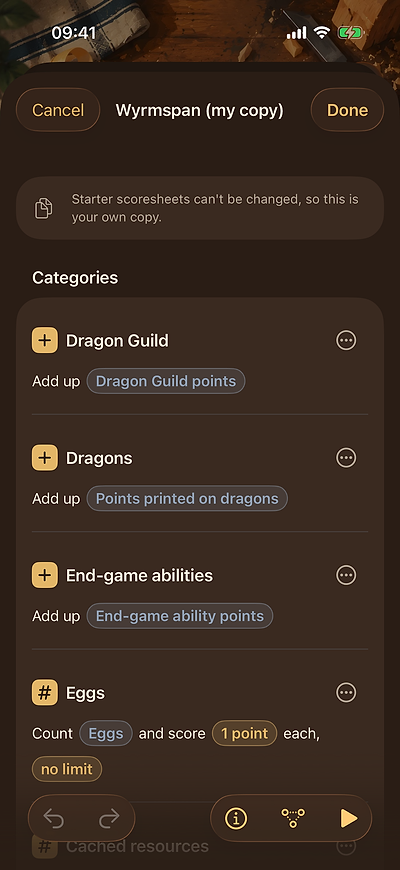
A line reads as a sentence, like "Count Eggs and score 1 point each". Tap any coloured part of it to change it. The ⋯ menu on each line has Rename, Duplicate, Counts towards the total, How this line scores, which opens its part of these docs, and Delete. How scoresheets work, at the foot of the editor, opens this page. Touch and hold a line to move it: the order is the order you'll fill them in.
Try it before you save
Try it, the ▶ button at the foot of the editor, scores three sample players, Ann, Ben and Cal, exactly as logging would. Fill in randomly fills every box; nothing is saved. Graph, the button beside it, shows how the lines feed into each other, which helps once one line is worked out from others.
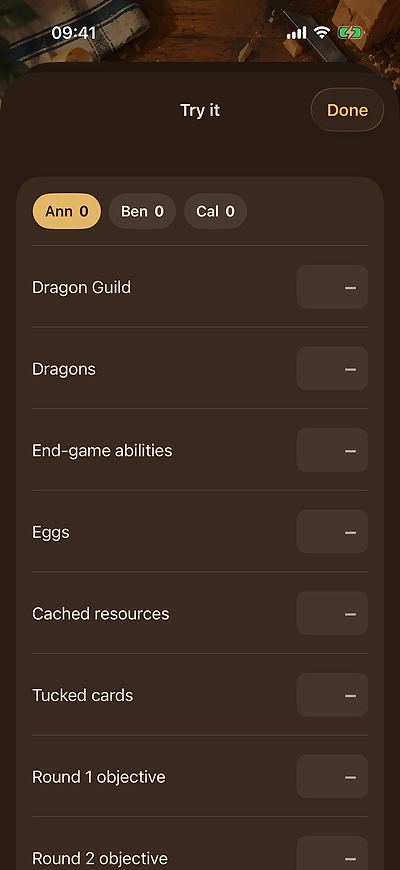
Undo and Redo work on every change. Done saves, once the sheet has a name, a game, and at least one line that counts. Cancel with changes asks Throw away your changes? first.
If the editor says…
Anything that needs fixing shows in red: at the top for the whole scoresheet, or on the line it's about. Done and Try it wait until it's fixed.
| It says | What to do |
|---|---|
| Give it a name. | Open Details and fill in Name. |
| Choose the game it's for. | Details > Add a game. |
| Add a category. | A scoresheet needs at least one line. |
| At least one category needs to count towards the total. | Turn Counts towards the total back on for a line. |
| Best round and rounds won need categories scored in a round. | Add a round goal, or decide by Total of every round. |
| With best round or rounds won, only rounds count. Score this in a round, or stop it counting. | Make the line a round goal, or turn off Counts towards the total. |
| This round is past the last round. Add rounds in the details. | Raise Rounds in Details, or change the goal's round. |
| The ranges overlap or run backwards. Each should start after the last one ends. | Each range's From must come after the last range's To. |
| Give at least one place some points. | A ranked line needs points for at least one place. |
| Add at least one option. | A pick needs something to pick. |
| Every card needs its points. | Give each card Per match points or ranges. |
| Choose which category this uses: one it read has gone. | A line it was worked out from was deleted: choose another. |
| This reads itself through another category. Pick one above it. | A worked-out line can only read lines above it. |
| “Eggs” is used as two kinds of count. Pick a different count. | One count can't be typed in one line and tallied in another; give one of them Give this category its own count. |
| A number here is too large. | Numbers go up to 999. |
| The name is too long. | Names go up to 40 characters. |
| With one player, ranking scores nothing. | Shown in orange with Can be played solo on: nobody to rank against. |
Logging with it
When you log the game, choose Scoresheet. The app picks one for you: your Table's own scoresheet for that game first, then the one you used last time, otherwise Simple. Change lists the others.
Fill in one player at a time. Each line has a box, and once you've typed a count it shows the points it makes, like "→ 6". The keypad's Next runs down a player's lines, then on to the next player. The chips at the top show everyone's total as you go, with a crown on whoever leads.
You can type sums straight into a box: "4+3+3" or "2×6", worked out as you'd expect, and the working stays with the game. If you save with empty boxes, the app asks first and can fill them with 0.
Changing a scoresheet later
Change it any time. If a change could alter a score, the app saves it as a new version, and the games you've already logged keep the version they were scored with. Renaming a line or the sheet changes nothing that's been scored.
House rules for a Table
A Table can have its own scoresheets: Make a scoresheet, or Copy one to change from any scoresheet or starter (the copy is named ", house rules"). When you log that game at the Table, its scoresheet is chosen for you. At a shared Table, every member gets the Table's scoresheets; any member can change one, and only the person who made it can delete it.
Category stats
Once you've scored a few games with a scoresheet, the game's page shows each line's average, your best, and how little it's won with or how much it's lost with. A Table's page shows who leads each line, over three games or more.
What they can't do yet
- Scoresheets are for competitive games with two or more players. Solo, team and co-operative games are logged with simple scores for now.
- A score box takes 0 to 999. Only a line worked out from others or a penalty can take points away.
- Scoresheets can't be shared with friends yet, other than at a shared Table.